 gaetano
The Problem
In many enterprise environments, the Ansible control node cannot reach target devices directly due to network segmentation, firewall policies, or air-gapped networks. Instead, traffic must traverse one or more bastion hosts (jump hosts).
A bastion host is a special-purpose computer on a network specifically designed and configured to withstand attacks. It is hardened and serves as a single point of entry into a protected network.
Common challenges include:
- Ansible control node has no direct routing to target devices
- Intermediate bastion hosts lack Python (or other Ansible dependencies)
- Need to tunnel through SSH with dynamic port binding
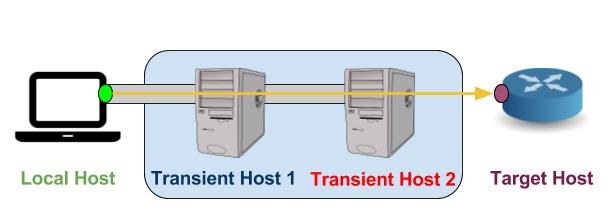
Solution: SSH ProxyJump with Local Port Binding
The solution combines SSH's ProxyJump (-J) feature with local port forwarding (-L) to create a tunnel chain, bypassing intermediate hops that don't need SSH.
Step 1: Establish SSH Tunnel through the Transient Host(s)
Create an SSH tunnel passing through the transient host(s) to the target host, with a local port binding created via -L:
ssh -J user_1@transient_host1:port_1 -p port_2 user_2@transient_host2 -L LOCAL_PORT:TARGET_HOST_IP:TARGET_HOST_PORTStep 2: Connect via Local Loopback
You can then directly enter the target host using the local binding:
ssh user_target_host@localhost -p LOCAL_PORTStep 3: Configure Ansible Variables
In this way, you can run Ansible playbooks on the local host by configuring Ansible variables accordingly:
ansible_host: localhost
ansible_user: user_target_host
ansible_port: LOCAL_PORT
ansible_password: password_target_host
By setting up the SSH tunnel in this manner, the tunnel is built through each transient host to the target. The local port binding on the Ansible master machine ensures traffic is forwarded correctly through the chain of bastion hosts to the target host.
Practical Workflow
- Start the SSH tunnel in the background (or in a screen/tmux session)
- Run your Ansible playbooks targeting
localhost:9022 - All traffic flows through the bastion chain transparently
- Close the tunnel when done with
Ctrl+Cor kill the SSH process
local_action to dynamically create tunnels before running network tasks.
Key Takeaways
- SSH ProxyJump eliminates the need for Python on intermediate hosts
- Local port binding makes targeting transparent to Ansible
- Scalable to multiple bastion hops with chained
-Jparameters - Combine with SSH key authentication for seamless automation